Overview of SEO
Overview:
SEO stands for Search Engine Optimization. It is the process of improving a website’s visibility and ranking on search engine results pages (SERPs) to attract more organic (non-paid) traffic. The goal of SEO is to make a website more relevant and appealing to search engines like Google, Bing, and others, so that it appears higher in search results for specific keywords or phrases.
Key Parts of SEO:
- On-Page SEO:
- Content: Creating helpful, relevant content with important keywords.
- Meta Tags: Optimizing titles and descriptions for search engines.
- URLs: Using clear and descriptive links.
- Internal Links: Connecting pages within your site.
- Off-Page SEO:
- Backlinks: Getting other websites to link to yours.
- Social Media: Promoting your content on social platforms.
- Technical SEO:
- Site Speed: Ensuring your website loads quickly.
- Mobile-Friendly: Making sure your site works well on phones.
- Crawlability: Making it easy for search engines to find and index your pages.
- Security: Using HTTPS to secure your site.
- Local SEO:
- Google My Business: Optimizing your business for local search results.
- Local Keywords: Targeting keywords related to your location.
- Consistent Info: Keeping your business name, address, and phone number accurate online.
SEO helps your website appear higher in search results, bringing more visitors without needing to pay for ads. It's a cost-effective way to grow your online presence.
Search Engine Ranking's:
_______________________________________
Several factors affect search engine ranking for an eCommerce website.
Here are the key elements that influence how well your site ranks in search engine results:
- Content Quality:
Unique Product Descriptions: Avoid duplicate content by writing original descriptions for each product.
Engaging Blog Posts: Regularly publish blog like content related to your products, which can attract traffic and improve rankings.
User-Generated Content: Encourage customer reviews and ratings, as they provide fresh content and keywords. - On-Page SEO:
Keyword Optimization: Use relevant keywords in title tags, meta descriptions, headers, and throughout your content.
URL Structure: Use clean, descriptive URLs that include keywords.
Image Optimization: Use descriptive file names and alt text for images to help them rank in search results. - Technical SEO:
Site Speed: Fast-loading pages are crucial for both user experience and search rankings.
Mobile Optimization: Ensure your website is fully responsive and works well on mobile devices.
Secure Website (HTTPS): Having an SSL certificate (HTTPS) is important for security and ranking.
Crawlability: A clear site structure, XML sitemap, and properly configured robots.txt file help search engines crawl and index your site effectively. - User Experience (UX):
Easy Navigation: A user-friendly interface and intuitive navigation help visitors find what they need, reducing bounce rates.
Dwell Time: The longer users stay on your site, the better it is for your ranking.
Low Bounce Rate: A lower bounce rate signals to search engines that your content is relevant to users. - Backlinks:
High-Quality Links: Backlinks from authoritative and relevant websites boost your domain authority and ranking.
Natural Link Building: Focus on earning links naturally through quality content, partnerships, and outreach. - Local SEO:
Google My Business: If you have a physical store, optimizing your Google My Business profile can improve local search visibility.
Local Keywords: Use keywords that include local terms, especially for customers searching for nearby services or products. - Structured Data (Schema Markup):
Rich Snippets: Use schema markup to display rich snippets (like star ratings, prices, and availability) in search results, which can improve click-through rates. - Internal Linking:
Logical Linking Structure: Use internal links to guide users to related products and important pages, which helps search engines understand your site structure. - Social Signals:
Social Media Activity: While not a direct ranking factor, social media shares and engagement can drive traffic to your site and enhance its visibility. - Domain Authority:
Age and Trust: Older, well-established domains tend to rank better.
Brand Recognition: Strong, well-known brands often perform better in search rankings. - SEO for Images and Videos:
Optimized Media: Ensure all images and videos are optimized with alt text, captions, and relevant file names to help them rank in search results. - Content Freshness:
Regular Updates: Frequently updating your website with new products, content, or blog posts signals to search engines that your site is active. - Customer Reviews:
Positive Feedback: High ratings and good reviews can improve your visibility in local searches and build trust with both users and search engines. - Security and Compliance:
Data Protection: Ensure your website complies with data protection regulations, such as GDPR, and secures customer information. - E-A-T (Expertise, Authoritativeness, Trustworthiness):
Content Quality: High-quality, well-researched content that establishes your site as a trustworthy source can positively impact your rankings.
By focusing on these factors, you can improve your eCommerce website's search engine ranking, driving more organic traffic and potentially increasing conversions.
Optimising your Website for SEO:
_______________________________________
Where should I start with my Website SEO?
The first step is to identify the places in which you should optimise first
- Top pages/ Categories
Login to Google Analytics and run a search to see what your top page results are. This is a great place to start as you are building on the page ranking you have already established. - Search Results
Another place to start is by investigating what your customers are searching for. You can find this information in Google Analytics.
- Website Main Navigation
The items you have in your main navigation are typically those you want your customers to navigate to, so these are also a good place to start
What key things should I note when optimising my website?
- Keywords in Content
Once you have identified the above places to start, you then need to make sure that the meta keywords you will be adding to these places are present.
So if you have added keywords such as 'fashion tops, handmade, NZ made etc' You need to make sure these feature within your page content. This will help google to rank your page accordingly.
- Category Pages
Although you typically will feature products on these pages it is important to also include text. Google uses text to help identify what the content is about. So is always best to add a category description where possible
- Images
When adding new images to the site make sure to add ALT text (alternative text).
ALT text is a word or phrase that can be inserted as an attribute in an HTML document to tell the website views the nature or contents of an image. This also assists google in ranking your page.
- Format
Another key item is when adding content to your website is to make sure you are using the correct formatting i.e. H1 tags (heading 1) Using the correct headings tags to lay out your content within a page will assist google in learning what your page is about and ranking it accordingly
Components of SEO in MaxCommerce:
_______________________________________
Browser Title Override?
A browser title override is text which displays in your browsers tab as well as when you hover over with your mouse a tool tip will be displayed with the full title

With these ones, you want to make sure you first have your ‘website name’ and then what the category/page/blog is about.
Example: For a new arrivals shop page you could have ‘Website l New Arrivals’
Note the line in between helps to distinguish the website name and the page info.
Here are simple recommendations for browser title overrides on an eCommerce website:
- Be Descriptive: Make sure the title clearly describes the page, such as the product name, brand, and key feature.
- Use Keywords: Include relevant search terms, but avoid overstuffing with keywords.
- Keep a Consistent Format: Use a standard structure
- Include Your Brand: Add your store name at the end for brand recognition.
- Limit Length: Keep titles under 60 characters to avoid being cut off in search results.
- Prioritize Key Pages: Focus on optimizing titles for your most important pages.
- Avoid Duplicates: Ensure each page has a unique title to improve SEO.
These tips will help you create effective titles that boost search rankings and attract more visitors to your eCommerce site.
_______________________________________
Meta Keywords
Meta keywords provide information about the category, which can be used by search engines to help categorise the page correctly.
Your keywords need to be descriptive as to what your category/page/blog is about i.e. tops, skirts, pants, knitwear, outerwear, dresses, occasionwear, jacketsIt is also worth including your website name in this field to also help with ranking.

_______________________________________
Meta Descriptions
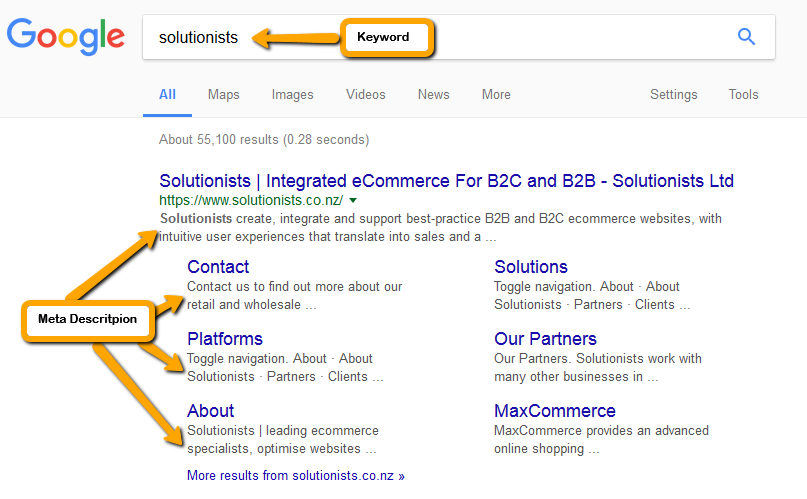
Meta descriptions, while not important to search engine rankings, are extremely important in gaining user click-throughs to your site. These short paragraphs are an opportunity to advertise content to searchers and to let them know exactly whether the given page contains the information they're looking for.The meta description should employ the keywords intelligently, but also create a compelling description that a searcher will want to click. Direct relevance to the page and uniqueness between each page's meta description is key. The description should optimally be between 150-160 characters.
Here are simplified recommendations for writing meta descriptions on an eCommerce website:
- Keep It Short:
- Stick to 150-160 characters to ensure the full description is visible in search results.
- Use Keywords:
- Include relevant keywords that match what users are searching for.
- Highlight What’s Special:
- Mention key benefits, special offers, or unique features.
- Encourage Action:
- Use phrases like “Shop now,” “Discover,” or “Buy today” to prompt users to click.
- Customize for Each Page:
- Write unique descriptions for each page, focusing on what that page offers.
- Be Honest:
- Make sure the description accurately reflects the content of the page.
- Test and Improve:
- Monitor performance and adjust descriptions to improve click-through rates.
- Use Local Info:
- If relevant, include location-specific details for local searches.
Example Descriptions:
- Product Page: “Buy the latest Nike Air Max 270. Comfort and style in multiple colors. Free shipping on orders over $50.”
- Category Page: “Shop eco-friendly kitchen gadgets. Reusable bags, energy-efficient tools, and more.”
- Homepage: “Find quality furniture at great prices. Free delivery on all orders. Shop now!”
These tips will help create effective meta descriptions that attract clicks and boost your search engine visibility.
_______________________________________
Display in Google
Google is constantly crawling your site to keep its search engine up to date. So, it is best to check back overtime to review how your meta keywords and descriptions are going – refinement/ maintaining this work is the key.
Once this information is indexed by google and processed it can be displayed like the below if the ranking is high –
How to Optimise your Website in MaxCommerce:
See below for key SEO Help Guides for your MaxCommerce website
_______________________________________
SEO for Image | |
SEO for Pages | |
SEO for Categories | |
SEO for Products | |
SEO for Blogs* |
*if configured for your website