Your Company Dashboard
When you log into the Client Portal, you will land on your company's ticket dashboard. From here, you can access the most important information, such as tickets awaiting your team's attention, tickets in your next release and more.
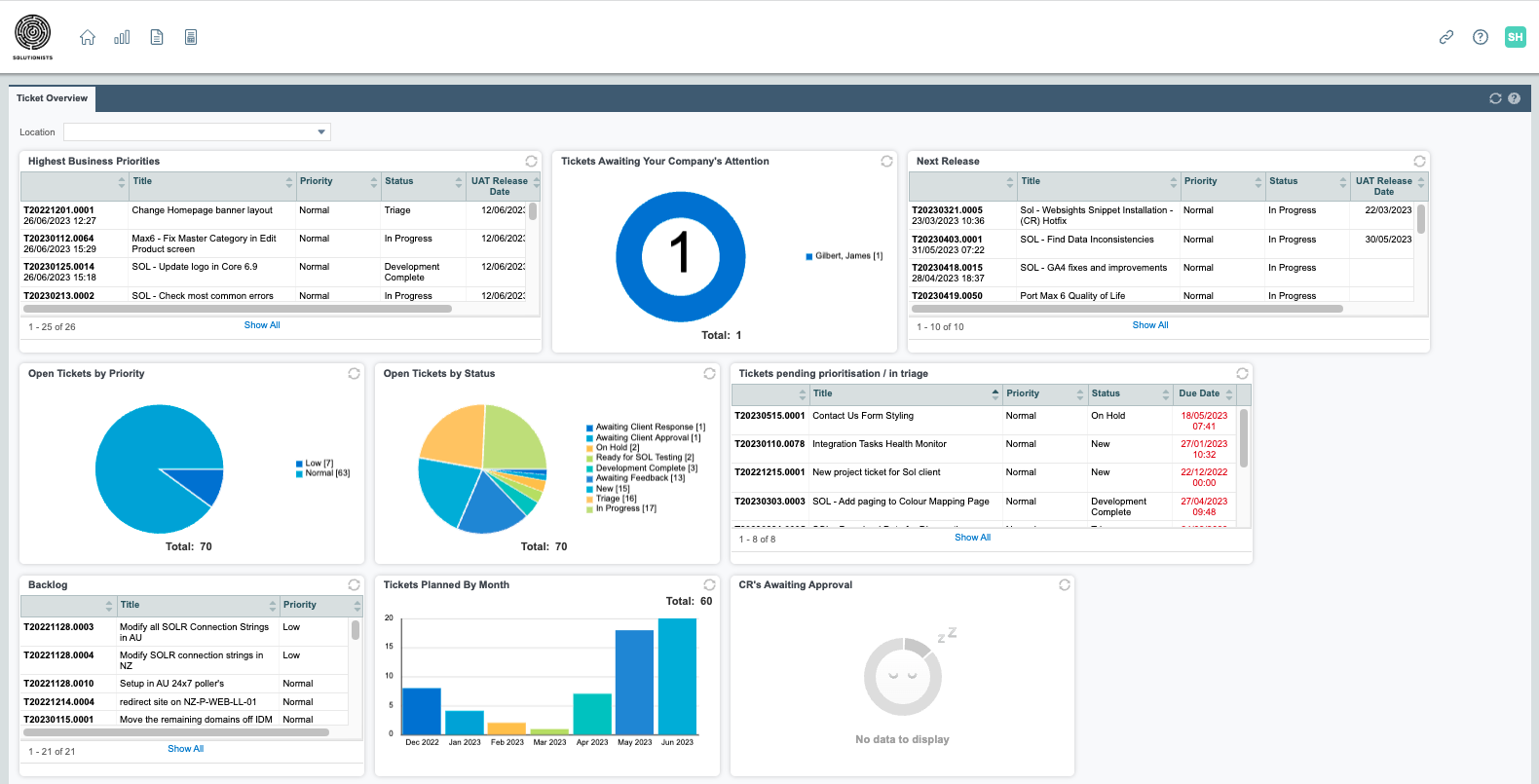
Tickets Dashboard
This dashboard features everything you need to know about your open tickets. This dashboard will include helpdesk, scheduled support tickets as well as project tickets.
Highest Business Priority - Open Tickets
- Any open ticket that is associated with your current release will be listed here. Click into "Show All" to see the full list. From the full list, you may then click into any ticket to see more details.
Tickets Awaiting Your Company's Attention
- Any ticket with status "Awaiting Client Response", "Ready for Client Testing", "Awaiting Client Approval" or "On Live" will be captured in this widget. If several of your team members log tickets, you will be able to see how many tickets each of your team members is currently assigned to as the "Ticket Contact". You can click on one of your team members to open the list of tickets with them to see more details.
Next Release - Open Tickets
- Any open ticket that is associated with your next release will be listed here. Click into "Show All" to see the full list. From the full list, you may then click into any ticket to see more details.
Open Tickets by Priority/Status
- There are two widgets that give you some insight into any open tickets by priority and status.
- You can click on the chart for one of the priorities/status to get taken to the full list of tickets applicable. From the full list, you may then click into any ticket to see more details.
Tickets pending prioritisation / in triage (Helpdesk tickets)
- Any open Helpdesk tickets will be listed here. Click into "Show All" to see the full list. Click into "Show All" to see the full list. From the full list, you may then click into any ticket to see more details.
Ticket Backlog
- Any open ticket that is yet to be scheduled will be listed here. Click into "Show All" to see the full list. From the full list, you may then click into any ticket to see more details.
Tickets Planned By Month
- This shows the volume of tickets that are planned to be worked on/completed by month.
CR's Awaiting Approval
- Any item / change request that requires your approval will be shown here.