Menu & Category Structure
Within your website you need to determine how you are going to structure your website. This will help you build and define categories for your products and create attributes and determine the pages you need to fill out and what your menus will look like.
Key Areas to Understand:
Main Menu Navigation
This is the menu which sits in the header of your website. Here you can build several levels for your customers to navigate your website by.
We recommend having no more than 6-8 top level menu items. In saying that do consider the length of the menu item itself as this may influence the number you have.
In most cases you want to showcase shoppable items for your customers and also highlight the range of products they can buy from you. And any other key items your business has i.e. special services etc
Rather than having a top menu item called 'Shop' and then all of your categories underneath. You should instead have your top level categories making it quicker for your customers to shop and also to show your product range
___________________________________________________________________________________
Footer Menu Navigation
This menu sits in the footer of your website and is typically where your T&C's of the website will sit and other secondary information such as manufacturing info, warranty info, shipping & returns policies etc.
Its also a great place to include contact details and or social links.
___________________________________________________________________________________
Product Categories
The best way to group your products is into shop categories in the first instance and following this utilising attribution data to further help customers locate what they are after is also key.
Ideally you may have 1 - 3 categories and from there leverage attribution data.
- Top Level categories should show on your main menu navigation
- Second level categories should further group products and will show in a dropdown if configured on your main menu navigation.
- Third level categories should be specific and used as filters when entering the upper category levels
___________________________________________________________________________________
Create a Structure
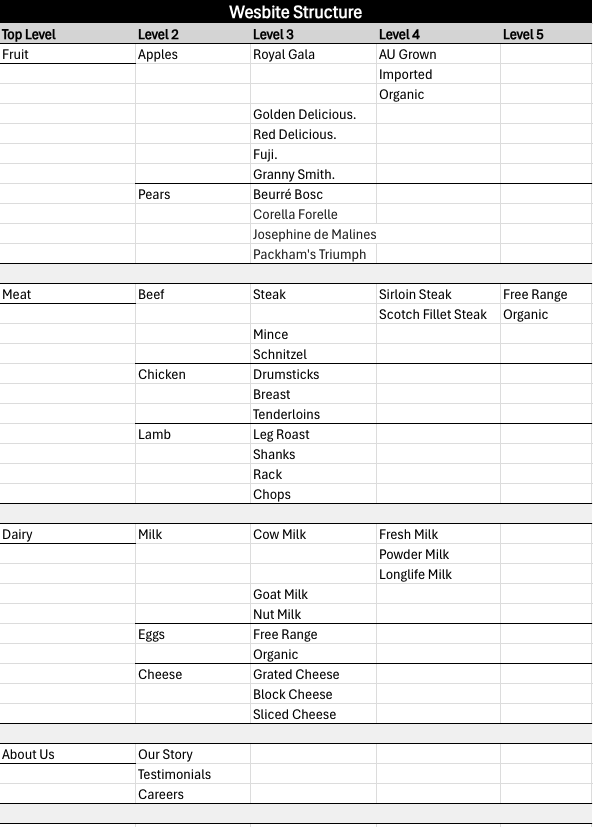
To help you map out what your website structure will look like when it comes to menus and categories, it is best to create a sitemap.
You can do so in an excel file using columns and rows to help map out the different levels.
See below for an example for a food shop website
___________________________________________________________________________________
Example - Categories:
- Top Level: You will see that the top level is categorised into food sections this is what would show on your main navigation in the header of your website.
- I.e. Fruit, Meat, Dairy
- Second Level: The second level goes into more details breaking down further, what is available in the top level category. If you created your main navigation to have a dropdown this is what would show when a user hovers their mouse over the corresponding top level menu item
- I.e. Meat > Beef, Chicken, Lamb
- Third Level: This is where you can start to get specific or into technical detail.
- I.e. Meat > Beef > Steak, Mince, Schnitzel
- Fourth & Fifth Level: At this level you are moving into attribution sort of data
- I.e. Meat > Beef > Steak > Sirloin > Free Range, Organic
___________________________________________________________________________________
Example - Main Menu Navigation
Next you can take your Top level categories above and any other key content pages and create your main menu navigation
For example:
- Fruit
- Meat
- Dairy
- About Us
___________________________________________________________________________________
Example - Footer Menu Navigation
Once you have done the above you can build out your footer menu.
Consider what other content pages you need and group accordingly.
For example:
- About
- Our Story
- Services
- Careers
- Here to Help
- Contact Us
- Terms and Conditions
- Privacy Policy
- Manufacturing Info
- FAQ
- Shopping With Us
- Click and Collect
- Delivery
- Returns & Exchange