SEO for Pages
Overview:
Optimizing SEO for pages on an eCommerce website helps increase organic traffic, improve user engagement, and boost conversions.
Here are key strategies to enhance SEO for your eCommerce pages:
- Optimize Page Titles
Make sure each page title is unique, descriptive, and includes targeted keywords. Page titles are one of the most important ranking factors.
Example: "Buy Affordable Laptops Online | Top Brands | [Your Store Name]" - Use Meta Descriptions
Write compelling meta descriptions that include relevant keywords and a call to action. Though not a direct ranking factor, meta descriptions can improve click-through rates (CTR).
Example: "Shop the latest laptops from Dell, HP, and Apple. Find great deals and enjoy fast shipping at [Your Store Name]." - Craft your Content with SEO in Mind
Every page should have unique content that adds value. Consider the strutucre of the page using H1's etc. While also targeting key words, physical store locations and more. - Track Performance with Analytics Tools
Use tools like Google Analytics and Google Search Console to monitor the performance of your eCommerce pages. Track key metrics such as traffic, conversion rates, bounce rates, and keyword rankings to continually improve.
By implementing these SEO strategies, you can improve search engine rankings for your eCommerce pages, attract more targeted traffic, and enhance user experience, leading to higher conversions.
SEO Page Optimisation via CMS
Included in your CMS there is an SEO Optimisation tool where you can work to improve your ‘pages’ SEO rankings.
You can find this in the CMS > Pages > Select the required page > SEO Optimisation Tab.
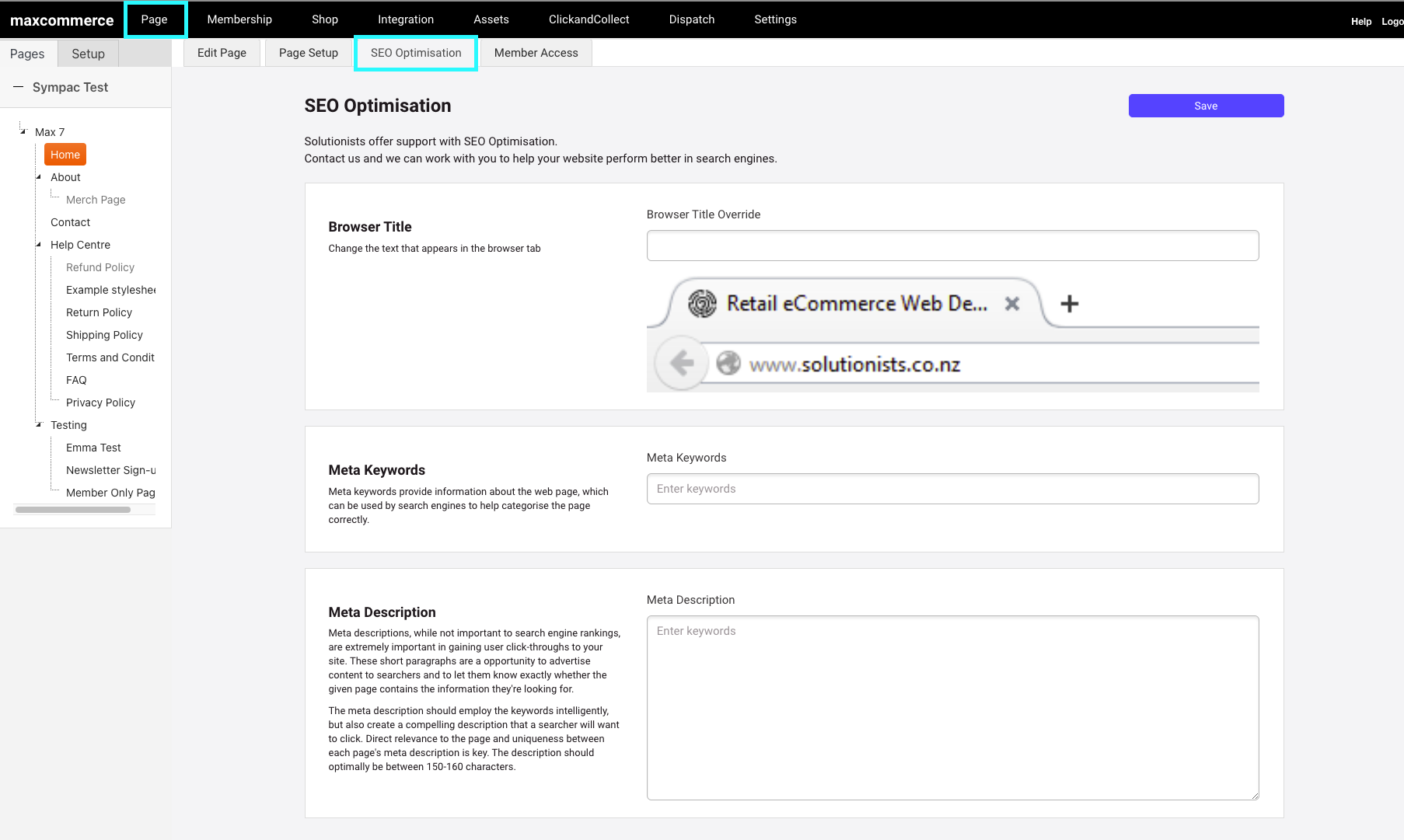
In here you will be able to craft the below for your pages. Enter your content and once complete click the save button in the top right hand corner.
Browser Page Title Override
Find out more about what Browser Title Override is Here
Meta Keywords
Find out more about Meta Keywords is Here
Meta Descriptions
Find out more about Meta Descriptions is Here
Content Creation Considerations
When you are crafting your page content is is important to consider SEO elements.
See below for tips and tricks to consider:
- Create Unique, Keyword-Rich Content
Every page should have unique content that adds value. Avoid duplicate content and ensure that the content is informative and keyword-optimized.
Example: Include details like product features, benefits, and how-tos. - Optimize Heading Tags (H1, H2, H3)
Use proper heading tags with relevant keywords to organize content hierarchically. The H1 tag should include the primary keyword, and subheadings (H2, H3) should include secondary keywords.
Example:
H1: "Best Laptops for Home and Office Use"
H2: "Top Features to Look for in a Laptop"
H2: "Popular Laptop Brands"
This is where the 'format' button in your rich text content area is handy: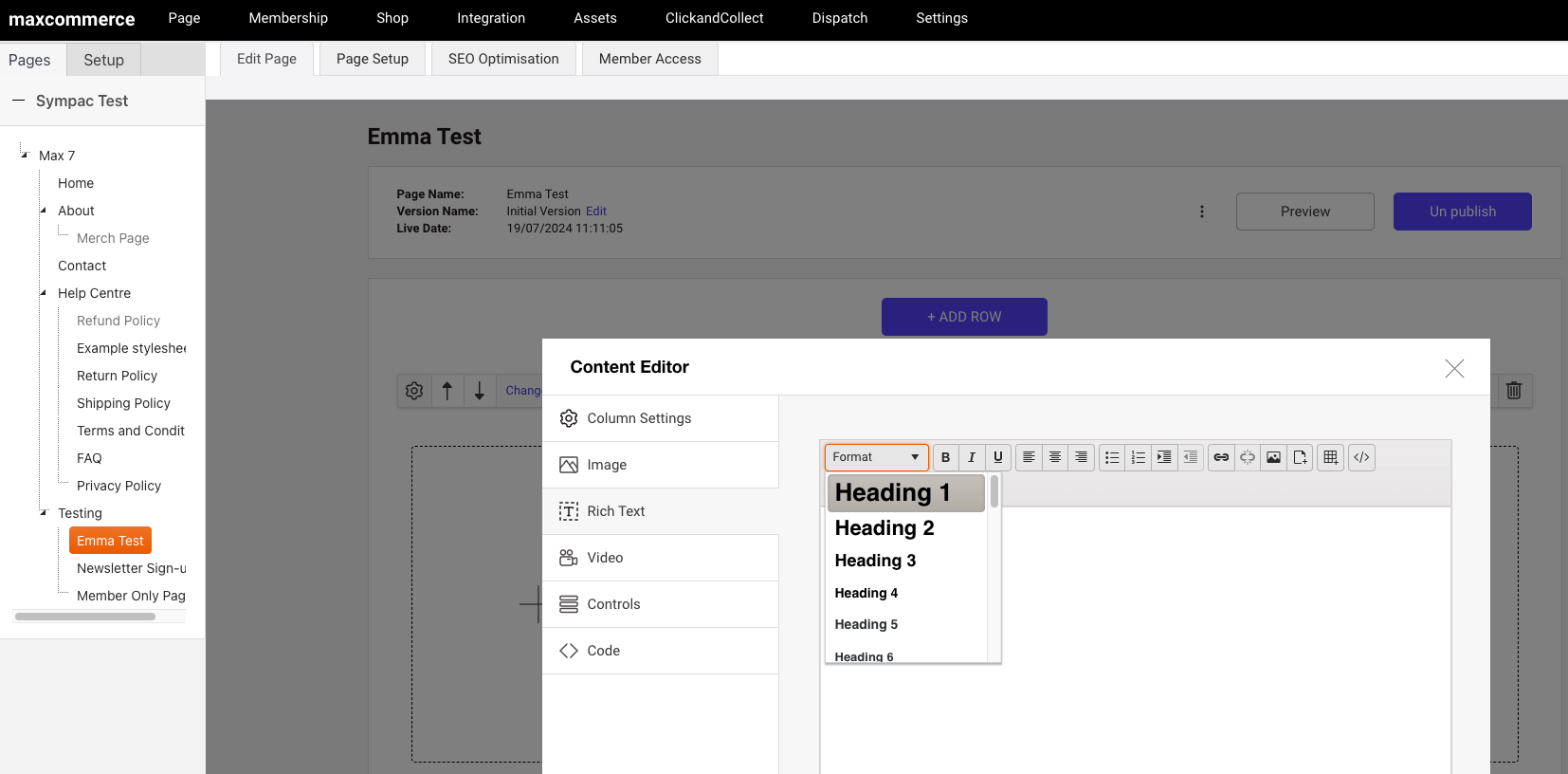
- Improve Internal Linking
Link to other relevant pages on your site to help users discover more content and help search engines crawl your website better. This also distributes "link juice" to important pages.
Example: On a product page for laptops, link to related products like laptop bags or accessories. - Use Alt Text for Images
Include descriptive, keyword-rich alt text for all images to help search engines understand what they depict. This can also improve your ranking in image search results.
Example: "13-inch Dell XPS laptop with Intel i7 processor" - Optimize for Long-Tail Keywords
Target specific, less competitive long-tail keywords that potential customers are likely to search for. This increases the chances of ranking for highly specific queries.
Example: Instead of “laptops,” use “best laptops for graphic design.” - Create Valuable, Shareable Content
Add posts, buying guides, or FAQs to help customers make informed decisions. Content like this can be shared, attracting more traffic and links. - Optimize for Local SEO
If you have physical stores or offer local services, optimize for local search by including location-based keywords, setting up a Google My Business profile, and ensuring consistent NAP (Name, Address, Phone) information across the site.
Page Bulk SEO Management
Within the CMS of your MaxCommerce website you also have the option to bulk manage your SEO for your pages.